May 26

Back online (with a vengeful look)

This blog site has been NEGLECTED. The hosting provider has been hit by the CPanel vulnerability CVE-2026-41940 and my hosted files were part of what became “unrecoverable.” This would have been after April 29 but it took more than 2 weeks for me to notice.

The hosting support sent this response on my ticket when I reported that my site is unavailable.

We sincerely regret to inform you that your account is among the small group (~3-4%) affected by a recent security incident. We understand the seriousness of this and truly appreciate your patience during this time.

A critical cPanel/WHM vulnerability (CVE-2026-41940) was actively exploited at a global scale.
The issue originated in the cPanel service layer (port 2083) , allowing unauthorized access before an cPanel official fix was released (CVE-2026-41940).
Data on both live server and backup storage was encrypted , and recovery is not possible in these cases.

Two nights later and a crash course in mysql+phpadmin this site is back online, plus minus a few comments. I couldnt locate the notepad theme so I am settling with this new spiffy Anarcho notepad theme, free of course. The main site‘s download is redirecting to a page not found URL , and getting the theme uploaded from an export from the Github repository was hitting the upload limit from the domain hosts because the export is more than the 2MB upload limit.

The limit is set at the PHP system config that is only read-only for my account. Thankfully the Deployer for Git extension has provided an alternative which is to install themese and plugins directly from the public git repo. Just be careful when you use this as this is a good way to hijack the site. Deactivate it as well if its not going to be used.

This is sufficient for now but I want to tweak the rendering page to have more width. Another simple project to chuck in the back burner. 🙂

Category: Garbage | LEAVE A COMMENT
January 15

IT Snippet: VS code tab color

VS Code is my current editor of choice in the workplace as it is already pre-approved by the client and I dont need to jump through IT exception hoops to get PsPad allowed to be used. Its a bit bloated for my taste but it is starting to grow on me as I get used to the keybindings.

One thing that I am having problems is tracking which tab I am currently using. I normally have a dozen files open at any given time, and that number increases when I do file-by-file comparison within the VS Code editor. A quick search and the flow and configuration snippet allows me to change the color of the active file tab to the color of my choice.

  • control+shift+P , then select the “Open User Settings (JSON)” option
  • Add (or update) the following snippet in the outermost/parent brace.
           "workbench.colorCustomizations": {
               "tab.activeBackground": "#00AA00"  #for green 
           }

Save and it automatically gets applied!

Category: Tipjar | LEAVE A COMMENT
January 6

Garden bounty: Air Fried Okra

Returning to our NCR house after the holiday break yielded a small bounty from our small urban garden: a chili pods, tomatoes, eggplants and a fistful of okra:

The young okra pods were added to our seafood sinigang but a few were already too mature and very fibrous. I found some links in the web for air-frying mature okra and converting them to chip snacks. The premise is that the slimy interior will steam and allow the okra to become crispy. Below are the procedure and notes of this snack experiment.

Procedure

  • Wash and cut the okra into small “chips/buttons” which I did on a bias (angle).
    • There were some recipes that recommends a lengthwise cut ala fries but I advise against doing that the same way that steak are always sliced “against the grain” to make the meat softer.
  • At this point, I pre-heated the airfryer to 190-200 degrees Centigrade for 3 minutes. Our airfyer is small enough that this is sufficient time to heat the whole chamber.
  • Put in a small bowl and drizzle with a bit of cooking oil – just enough to coat each chip and allow the spices to stick.
  • Sprinkle salt and the spice of your choice. We have some cajun spice in the pantry so I used those. Toss the okra lightly to ensure each chip gets some seasoning.
  • Air-fry at 190 Centrigrade for 15 minutes, shaking the basket halfway.
    • Each air fryer model is different so I was shaking the basket every 5 minutes.
  • Allow the okra chips to cool and serve. You can use your favorite dip but I didnt use any.

Verdict

The resulting chips were still fibrous as hell! Next time just cut up the mature okra pods and add them to the compost. 🙁

Category: Garbage | LEAVE A COMMENT
April 28

Dos and Donts with cooking the Cabanatuan longganisa

I am biased but ever since living in Metro Manila I never bought a single longganisa from the public market or grocery chains to be cooked at home. It has always been always the Cabanatuan longganisa (or “langgonisa” as it is called in most areas in Nueva Ecija) or bust in our household. There is already a few posts on how to cook it so here is just the quick rundown of what to do and what to avoid with this recado sausage. 🙂

  • DO use a pan that you can scrub after for cleanup. Trust me, those non-stick pans are not going to last. 🙂
  • DONT just fry the longganisa links in oil. That is not how to properly cook it and in most cases you wont need to add the extra oil.
  • DO cook the longganisa in water. About 1/4 to 1/3 or the links should be submerged in tap water, and turn it over now and then until all the water evaporates.
  • DO prick the skin of the longganisa once all the water has evaporated so that the rendered oil can get into the pan.
  • DO toast the skin but dont burn them.
  • DO put day-old rice into the pan to get all those toasty goodness into a fried rice to accompany the logganisa. And since the Cabanatuan longganisa is recado (“garlicky”) then there is no need to add anything except a bit of salt to your fried rice.

Caveat:  We now cook the longganisa in the air fryer. I just put a parchment paper under it for easy cleanup and oil extraction since we have those circular basket type. I still put in water at the start. 15 minutes at 160 degrees centigrade, flip and then 7-8 minutes more  at 170 degrees.  Another benefit of this cooking route is that the logganisa can go straight from the freezer to the airfryer basket, just ensure there is a single layer of sausage so they all get boiled first.

April 27

NNTO and EOM

Context: Saving this emailed message I sent to one of my previous project teams. That project engagement (including the client and other providers) have a penchant for using NNTO, EOM, PFB and PFA in email conversations.

====
Subject: [Did you know that…] NNTO and EOM are only intended for emails that does not need to be opened?

NNTO is the abbreviation for “No Need To Open” and EOM stands for “End of Message”.

These are employed in subject headers to save the recipient time and the hassle of downloading the message and opening it up. The intent is that the recipient will be able to grasp the whole message by only reading the subject line.

With the same regard, if you respond to an email that initially had the NNTO and EOM in the subject line by writing in the email body then it is common netiquette to remove the NNTO or EOM from the subject of your response email, otherwise the recipient has less of an obligation to even open up your response to read your message.

Email netiquette also calls for limiting the use of abbreviations in the body of your email messages. Those are useful for limited input mediums like SMS, or limited devices like a GPRS-only handset but does not add a value to email communication. Contrary to popular belief in this project, PFB and PFA are not publicly used initialsms. Spare your recipients the additional hassle and type the whole phrase. Your communication karma points will get an upgrade if you do this.

“There is no need for perfection, but there is always room for improvement.” – Unknown

====

April 21

Illusion of Choice

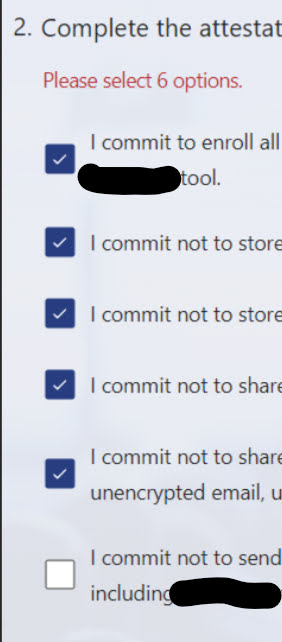
Lately I am seeing attestation forms in the projects I am working in wherein the contents are split across multiple checkboxes followed by a submit button. The beef I have is that the submit button will only be valid/enabled if all checkboxes are set to checked/true.

The problem with this approach is that it gives the wrong perception that you can say I dont agree to one or more of the provided options and you can still proceed. I assume the intent was to increase the possibility that the reader goes through each line but this is still bad form. The assumed intent does not guarantee that readers actually read the lines. All this does is increase the frustration of doing 5 more unnecessary clicks to the form.

If it was up to me, I will just list down the lines and then just put a checkbox at the bottom that states that the reader confirms to reading all the lines and agrees to follow them. It bears the same weight and legality, with 5 lesser clicks.

October 15

Scoped VS Code Powershell profile

As of writing, I am working on a very controlled client environment (i.e. Citrix session) where the home drive is in a network share, and the machine session has a locked policy of only allowing signed poweshell scripts to execute.

I have my scripts in the Powershell folder which then gets this error because they are not digitally signed.

A solution presented is to run a new powershell session with the execution policy for the current user set to Bypass. Normally this needs to be done as an admin but it should be doable using the normal user. I wanted this to be part of my VS Code setup and this is how I configured it:

  • Go to File->Preferences->Settings dialog (or press Ctrl+,)
  • In the search box, type in “@feature:terminal integrated.profiles.windows”
  • Click on the “Edit in settings.json” link to open the correct settings file.
  • Locate the Powershell entry and add the following argument stanza to the “terminal.integrated.profiles.windows” section.
    "args": [        
                "-noexit",      
                "-ExecutionPolicy",
                "Bypass",
                "-file",        
                "H:\\PowerShell\\functions.ps1"      
            ]  

  • Save the changes. This will now take effect in new terminal sessions started by VS Code using that profile.
August 5

PftG: Understand what you are doing

This is part of the “Posts from the Graveyard” which are emails I have sent to my then team or project. I am reposting them here for future reference before I finally delete them from my inbox.

The email was originally sent on August 1, 2014.

Team,

  I am not sure if you have come across these little idioms and quotations but these should be apt for what we do:

  • A stitch in time saves nine.
  • Knowing just enough to be dangerous.
  • A fool with a tool is still a fool. [albeit a dangerous fool]

  The gist is please understand what we are doing. Do not be complacent in submitting something because it will pass mechanical validation; it should pass the validation of another sentient being like yourself who actually know what is the purpose of the item being validated. Aim to craft and submit something because it is good enough that you wont be embarrassed to say “I created that stuff, marvel at how good it is. That is the <insert-your-name> mark of craftsmanship.” It was mentioned yesterday to complete forms by providing information that is actually useful. The challenge is applying that mentality to every little bit of thing that goes out of your plate. Will you be amenable to buying something that is sub-par with the amount that you are paying? Of course you want something that is of equal or greater value. It should be the same way when we are the ones handling the production side of the equation.

  If something is not correct, don’t contribute in perpetuating it. Aim to make things better. You can polish a turd till it shines, but it is still a turd.

ciao!

Category: Work | LEAVE A COMMENT