April 11

Window Farming

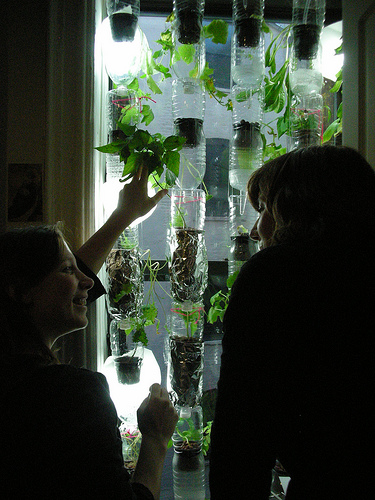
I came across this Window Farming site which promotes growing some of your food on your home/apartment windows if it gets enough sunlight.

WindowFarm
Image courtesy of Britta Riley’s Flicker Account

My gardening interests have grown dormant and my mini-produce plot has grown brown because of a couple of reasons like being away too long, extremities injury, etc. The most notable reason is still that nobody will water the plants when me and the wife are away.

The Window farm is a hydrophonic variant of home gardening and it uses an ordinary water pump (like the ones used in aquariums) to pump the nutrient-rich water into the recycled water-bottles that have been re-purposed as hanging pots. The pump makes sure the owners don’t forget to water the plants but that still means there is an electricity cost involved. I am thinking that coupling the pump with a solar panel would negate the electricity cost if there is ample sunlight and space. I haven’t gone through the manuals yet but in case the hydrophonic plants require 24×7 water flow then it might be a workable compromise to have the water pump working in the day and then adding some water retentive materials in the bottle-pot (e.g. coconut husk threads or rice husks if available) so that the plants would still have some accessible water at night.

I wonder how much solar panel is required to power an electric pump… Btw, watch this video for more information…

February 17

Here comes the Google N1 err HTC Desire

The Google Nexus One (N1) is currently my “it” phone fantasy as the sub-30K price is pretty reasonable considering the features. However the Philippines is not included in the list of supported countries, it would require a bit of work-around to get it delivered here in the philippines. Yuga has the instructions here if you are interested. He also gave it a pretty decent review rating of a “steal”.

The only problem with the above method is that if the unit breaks then you have to RMA it to the the USA as the local HTC service centers will not accept it for repairs. It is a bit of risk taking that I don’t have the luxury at the moment (let’s assume that I have the money to buy it in the first place 🙂 ). This problem maybe no more as the HTC Desire (formerly codenamed as HTC Bravo) has just been announced and there is a strong possibility to come to Asia.

The HTC Desire (pictured above) has the same specifications as the Google N1 except that it has replaced the trackball with a trackpad. It also comes with HTC’s Sense UI which some N1 users are missing.

Time to save for the “unfortunate” case that I need to replace my phone. Hopefully the Desire will also be in the 30K or less range when it gets offered here commercially. 🙂

More details and pictures here: http://dvice.com/archives/2010/02/htc-desire-andr.php

ciao!

February 14

[TipJar] Say What?

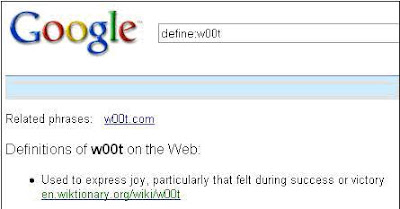
Have you encountered an unfamiliar word when reading email or an article in the web? Normally this would require a quick dictionary search but Google may present an easier route. Navigate your internet browser to www.google.com and enter the following in the search box:

define:[place unfamiliar word here]

If it is popular enough, Google will present the searched definitions.

Popular and upcoming words can also be searched:

Browsers equipped with a Google search bar may offer keyboard shortcuts that will make the process easier. For Firefox, Ctrl+K will send the focus to the search bar.

January 28

In Manila, the pedestrians accident you…

In homage to the “In Russia, the … you” meme.

In a very irritating turn of event, a pedestrian actually hit our car in JP Rizal street in Makati city. The man (whom I suppose is slightly drunk) broke two cardinal and basic rules of crossing the road:

  1. Look out for incoming cars, and
  2. Look at both sides of the road .

We were already traveling at around 40kph since there was no car ahead of us when I suddenly saw a man suddenly darted from the other side of the street to cross to our side. In a split second I saw that his face was glued to the other side and didnt even took a peek at our direction. The distance between him and our car was less than 20 meters so I started slamming the breaks and blaring the horn (mind you the horn of the Toyota Avanza is very loud). I also tried to slowly turn the car to the right side of the road but I was fearful that there would be speeding motorcyles so I couldn’t pull to the side quickly. It was a slow-motion sort of experience where I saw in my peripheral vision the man’s right cheek hitting the window behind me a split second before his body bounced off the middle door and as I was just able to bring the vehicle to a full stop.

I immediately opened the door and saw the man was standing up. His companions already rushed to help and check him out. I am thankful he wasn’t seriously hurt but I would imagine that come tomorrow he will have some bruises on his face and body when the anesthetic properties of alcohol wears off. It took the man a while to slur out “Nakita mo naman akong tumatawid..” (“You already saw me crossing the street…“) to which I irritatedly replied “Oo Manong pero ang lapit at ang bilis ko na. Di ka man lang tumitingin sa mga parating na sasakyan! Mag-ingat ka naman sa pagtawid!” (“Yes but I was already too near and travelling at high speed. You didn’t even check out the incoming cars! [Please] Exercise caution when crossing the street!“). The man’s companions let us go when they were assured that the man wasn’t permanently hurt.

I know that when it comes to accidents like that it will always be the driver of the incoming vehicle who is at fault. Even if the pedestrian is too stupid for their own good to obey basic rules for crossing the street, I still have a responsibility as I was manning a vehicle. I always keep watch of the right side of the road but I didn’t expect a pedestrian to slam me from the other side especially as I was in the outer lane of a 4-lane road.

The experience was my first vehicle accident (not counting this) and strengthened both my dislike for driving, my respect and fear for the deadly nature of a moving vehicle, and that you can’t really avoid an accident. It is too easy to snuff a life when you have at least half-a-ton of moving metal at your disposal. Especially in places wherein pedestrians lack the basic common sense to know basic road safety rules.

In homage to the “In Russia, …” meme: be extra careful when driving in the city because in Manila, the pedestrians accident you.

ciao!
January 28

[TipJar] Rock-a-bye-baby

[Advanced Disclaimer: Use the information in this posting at your risk]

If you want to minimize the amount of electricity used by your computer but dislike shutting down your computer because of the amount of time it need to start it up and open your applications, there is a compromise to be had if your operating system is configured properly to hibernate.

Hibernating an operating system means that all the information in the system memory (RAM to be precise) is written down as a “snapshot image” to the hard disk. The PC hardware is then turned off since the hard disk will not lose its information when powered down. When the machine is turned back on, the booting process of the operating system will look for a store snapshot image and load it back into the system memory. If this is successful, you will have your desktop at the same state as when it was hibernated. The time it needs to resume a hibernated image is relatively small compared to when booting the operating system from scratch (or what is called a cold boot).
All modern operating systems have support for hibernation but not all are enabled by default. To following steps will enable this feature in Windows XP:

  1. Go to Start->Control Panel->Power Options.
  2. Go to the “Hibernate” tab and ensure that the “Enable hibernation” check box is ticked. Click OK to dismiss the dialog and apply the change.
    WARNING: This will reserve space on the system drive equal to the amount of RAM in your computer. If you have 2GB of RAM, 2GB of hard disk space will be set aside for hibernation.
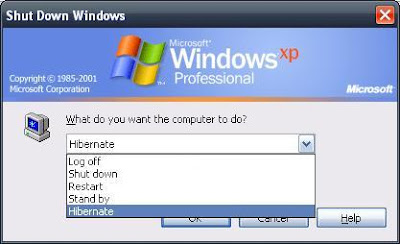
  3. To hibernate, shutdown the machine but select the hibernate option. The machine will be turned off automatically (if this is properly configured).
  4. To resume the hibernated image, turn on the machine. The image will be invalidated after a successful resume.

NOTES:
– Some applications, usually those that have time-bound login sessions, do not like being hibernated.
– The space set aside for the hibernation support is different with the space allocated for the virtual memory.
– If the machine fails to resume or hangs while in the process of resuming, reboot the machine and boot into safe mode (Press F8 after the BIOS screens). Reboot the machine to invalidate the hibernate images and the machine should boot normally after.

January 28

[TipJar] Office Copycat

MS Office provides a helpful function in ensuring that style consistency is easily done on the documents being created. The function is called the “Format Painter” which is part of the Standard toolbar.

If the icon is not visible (if not previously used) it can be added from the toolbar dropdown which is located at the end of the toolbar section.

How to use the Format painter:

  1. Highlight the text (or cells in spreadsheets) containing the style that you want to copy.
  2. Click on the “Format Painter” icon to copy the style into the painter memory.
  3. Highlight the text (or cell) that you want to have the same format.

Format Painter loses its “memory” after every cycle so repeat steps 1-3 as you see fit. Styles can also be used in Word documents to facilitate the document formatting process.

January 26

[TipJar] Removing zip integration from Windows Explorer

Zip integration was introduced starting Windows XP which enables the Windows Explorer to treat zip archives as a normal directory. This allows users to visit the content structure of the archive without depending on an external application like Winzip or extracting the content.

The downside of this integration is that Windows Explorer needs to finish reading all of the zip archives in the directory being visited before the directory contents are listed. This can cause a significant performance slowdown if there are many or huge zip files in the directory.

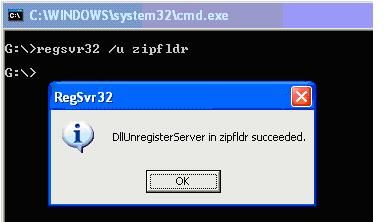
To disable the zip integration, the following command can be invoked (requires admin privileges):

regsvr32 /u zipfldr

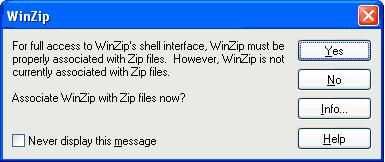
The command above will clear all zip file associations. If you have Winzip installed, launch a new instance and Winzip will prompt if you want to restore the association. Select the ‘Yes‘ option otherwise zip archives will not be handled properly when double-clicked from Windows Explorer.

If another archiver utility is used, look around the preference page for the association options if the prompt doesnt show at the startup of the the utility.

NOTES:

  • If Winzip was configured to not show the prompt above, the associations can be done from the Tools->Configuration->System menu.
  • If you are using a different application for handling archives (e.g. WinRar, 7zip, etc.), explore it’s configuration window or refer to the manual.
  • The command “regsvr32 zipfldr” will restore the zip integration of Windows Explorer.
  • BONUS: Dump Winzip and switch to 7zip. It supports more archive types, achieves significantly better compression, and best of all it is Open Source and free!