January 26

[TipJar] Before you flick me off…

Windows Explorer suddenly died and you are left with a bunch of application windows open. Before you perform a hard reboot by flicking off the switch, here are a few tips to enable the system to cleanly recover or reboot. These are all assuming that the system is still responsive.

Restart Windows Explorer

The Windows taskbar is actually handled by an instance of Windows Explorer. To launch a new instance, the following may be done:

  • Press “Alt+Tab” to cycle to an open command terminal. Execute the command “explorer” from there.
  • Press “Ctrl+Alt+Delete” and press the “Task Manager” button to launch the task manager. Navigate to the Applications tab and use the “New Task…” button to execute the “explorer” command.
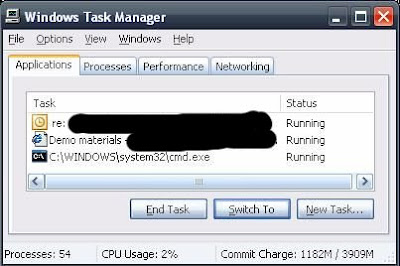
If the mouse is also not responsive, you can use the “Tab” button to navigate the controls in the dialog windows.

Restart Windows

If the new Windows Explorer instance also refuses to function, a soft boot of the operating system would be in order. Since the “Start->Logoff” menu will also be inaccessible, try using the shutdown command to restart the machine.

  • Press “Alt+Tab” to cycle to an open command terminal. Execute the command “shutdown -r” from there.
  • Press “Ctrl+Alt+Delete” and press the “Task Manager” button to launch the task manager. Navigate to the Applications tab and use the “New Task…” button to execute the “shutdown -r” command.

The shutdown command also has a graphical interface if you prefer to use a Window to shutdown a window. Invoke the command “shutdown –i” to launch the GUI.

If all else fails

A hard boot is the only remaining option. Try pressing and holding the power-off button for a few seconds to invoke the motherboard’s power-down feature. If this still doesn’t work then go for the last resort of pulling the plug.
January 5

[TipJar] Freeing up disk space in Windows

If you need to free storage space in your C:\ drive, here are the following files that are *relatively* safe to remove. See notes and disclaimer below.

  • Log files placed in log directories. Consult the application manual or your friendly neighborhood techie if you are in doubt.
  • Files with the “BAK” or “BACK” extensions. These are usually temporary files created by applications performing actions that physically alter the files. Evaluate if you still need the backup prior to removal.
  • Files with names starting with the tilde (~) symbol. These are temporarily files created by some applications (notably MS Office) that it failed to remove after the file was closed.
  • Zip files created to send whole directories via email. These should ideally be deleted after sending but for some reason they were left there. 🙂
  • [May require elevated privileges] Contents of the “%SYSTEMROOT%\Temp” directory. Delete as much of the files you can but there will be some file not available for removal as they are currently in use.
  • Contents of the “%USERPROFILE%\Local Settings\Temp” directory. Delete as much of the files as you can but there will be some not available for removal as they are currently in use.
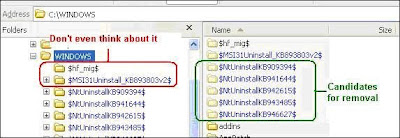
  • [May require elevated privileges] Directories in “%SYSTEMROOT%” that follows the format “[identifier]$”. These are information required to uninstall Official Windows patches.
    null

    • DO NOT REMOVE directories that do not follow the format above.

Notes and Mandatory Disclaimer:

  • As this tip deals with deleting of files, the information is intended for educational purposes only. Please think twice about permanently removing files (shift+delete, removing from the recycle bin). Use the information above at your own risk.
  • To know where your %SYSTEMROOT% and %USERPROFILE% directories are, execute the command echo “%SYSTEMROOT%” and echo “%USERPROFILE%” in a command window.
  • When removing uninstall information for Windows patches, consider leaving behind folders with “Date Modified” values of at most one month prior to the current date. The probability of uninstalling patches installed at older dates becomes small if the machine is in constant use.
  • Some files may require elevated privileges that are not granted to normal users. If this is the case and you need to free up space, seek assistance from your workstation administrator.
November 11

Mirroring the IT tip jar

I am maintaining an infrequent office distribution list that contains some tips and tricks regarding common utilities and apps that we use at work. I call that “newsletter” as “IT TipJar” which was initially intended for my co-project members. To quote the last description in an internal office blog:

What is normally just an email push to the members of our project team will now be mirrored in this blog. The primary reason is I am rolling-off from the project and there might be some people who are still interested to receive such information. Mail versions are still being pushed to my current project and those who have expressed interest in getting them but for the rest this personal blog would do.

What is It Tip Jar? It started as a cheesy IT tips and trivia posts that I think will help improve the day-to-day tasks while working with computers. Or at least get an understanding with how things work.

Isn’t that similar to the working smarter memos from CIO? Yes but the difference is that I am not taking responsibility with the tips and content I am sending out. I am not a nanny and I am a firm believer that our people actually have the necessary brain cells to decide what is morally proper. Just like the maxim “guns don’t kill. people do.” what I send out are just tools that can be gleaned from the Internet (which is probably where I find most of them in the first place) so whatever you do with them and the consequences are your own problem.

The decision to mirror the content here is that I also send the content to colleagues who have already left the company and who have express their intent to still keep on receiving these posts. The extra work would be worth it as that is how much I love you guys/gals. 🙂

ciao!

November 8

No more instant noodles

During my high school and college days the instant noodle was the king of the kitchen, the ultimate go-fer for the hungry mind and stomach. Forget bread, back then I could live on instant noodles alone and with egg if I want a luxurious treat. Adding steamed rice makes it a full meal. Philippine noodles are notorious for packing large quantities of MSG but I was young and nothing can touch me.

When I started going out with Neth my tolerance for MSG-laden foods went down because Neth’s family doesn’t really use MSG because of the reported health risks associated with it. I still get to enjoy noodles every now and then, and MSG when we eat out but everything went south when a simple breakfast of noodles and pan de sal (local breakfast bun) turned into a 3-day toilet bowl marathon for us. Since then I gave up eating noodles.

About a year ago I started sampling local noodles again, especially during weekends. The temptation of a quick breakfast is hard to ignore. But I realize that when I do have noodles for breakfast then I will have an excruciating headache in the afternoon. I always blamed the afternoon naps but recently I put two and two together. One Saturday morning I tried eating noodles and not on the following weekend. Lo and behold the pattern recurred so I guess that means forever saying goodbye to those multiplying variants of instant noodles that are invading the market. 🙁

From my Picasa

ciao!

November 1

A hodge-podge breakfast

hodge-podge: n a motley assortment of things.

That describes the breakfast I prepared today: guisadong burong mustasa (sauteed fermented mustard leaves), beef longganisa, garlic fried rice w/ star margarine, and then topped with tarragon tea. There is no binding theme except that they were all spur of the moment decisions and what is available.

Burrppp!

The beef longganisa was bought from our grocery trip yesterday, and it only made it because I haven’t tried that combination before. It’s an average tasting fare but I didn’t really expect it to compete with the venerable Cabanatuan longganisa (sorry my Ilocano friends, but your Vigan longganisa is a poor substitute. You just have the luxury of mass marketing. 😛 ). The burong mustasa is the last one from the batch we brought from Nueva Ecija five weeks ago. It’s a bit salty but this preparation got my wife to taste and like this delicacy. Plus I finally got to do something with the pots of tarragon that grows in the front-garden. 🙂

I am still smarting from the breakfast but there are some left-overs that will make it to lunch. 🙂

ciao!

October 23

Radio huhs?

  • A SMS message flashing on a very early TV-Radio show:

    “Pakigising naman po si [] … ” (“Please wake up [name]…”)

    I am still wondering how mass media can do that to a sleeping person unless their TV/Radio has a programmable alarm and they have perfectly timed it that it will go off at the exact time that message was posted. It would have been easier to just call that person’s phone or somebody from the same household.

    Here is your card….

  • A radio news anchor broadcasting the latest news about a potentially strong incoming storm:

    “May posibilidad na lumihis ang bagyo papuntang Taiwan. Magdasal tayo na sana lumihis nga at hindi na tamaan ang North Luzon.” (“There is a possibility that the storm’s path will deviate to Taiwan. Let’s pray that it will do so and miss the North Luzon area.”)

    I understand what the news anchor intends to convey but somehow the sequencing of the sentence was not right. Unless the $DEITY is the mischievous Loki, I don’t think it is right to pray that you pass on the suffering to your neighbor.

ciao!

October 12

Installing RTC 2.0 on a Windows Server 2003 machine

Installing RTC 2.0 client on the Win2003 machine provided by our customer is proving to be a challenge of patience and futility. I spent the better half of the day trying everything I can think of but:

– Using the bundled launchpad doesnt do anything: everything just quits without any warning or error.
– Invoking the launchpad using the parameters in the autorun.inf file () doesnt work.
– Invoking launchpad\launchpad.bat terminates with a wrong variable expansion.
– Invoking the various installer executable inside the win32 sub-directory produces a “Missing file install.xml” error and then will show the Installation Manager window. Unfortunately it cannot install anything even if the preference shows the repository to the RTC 2.0 extracted files are detected as “connected”.

I know the installer works because we have installed it fine on our WinXP workstations. The md5sum of the file in the Win2003 machine matches the one in our XP workstations.

Ready to give up and log a RTC bug, I did some more fiddling to gather more information and tried to download the web install even if it is going to be painful installing RTC on a slow and erratic connection. I got the same results.

Then I noticed that there were lots of files named install-[something].xml in the win32 directory but no install.xml file. An idea hit me and created a copy of the “install-client.xml” and renamed it to “install.xml”. I then executed the win32\install.exe and everything installed as expected.

And that concludes a whole-day wrangling on getting RTC 2.0 installed in the Win2003 server. Sometimes the best solutions are really those that hide under our noses. 🙁

ciao!