I am biased but ever since living in Metro Manila I never bought a single longganisa from the public market or grocery chains to be cooked at home. It has always been always the Cabanatuan longganisa (or “langgonisa” as it is called in most areas in Nueva Ecija) or bust in our household. There is already a few posts on how to cook it so here is just the quick rundown of what to do and what to avoid with this recado sausage. 🙂
DO use a pan that you can scrub after for cleanup. Trust me, those non-stick pans are not going to last. 🙂
DONT just fry the longganisa links in oil. That is not how to properly cook it and in most cases you wont need to add the extra oil.
DO cook the longganisa in water. About 1/4 to 1/3 or the links should be submerged in tap water, and turn it over now and then until all the water evaporates.
DO prick the skin of the longganisa once all the water has evaporated so that the rendered oil can get into the pan.
DO toast the skin but dont burn them.
DO put day-old rice into the pan to get all those toasty goodness into a fried rice to accompany the logganisa. And since the Cabanatuan longganisa is recado (“garlicky”) then there is no need to add anything except a bit of salt to your fried rice.
Caveat: We now cook the longganisa in the air fryer. I just put a parchment paper under it for easy cleanup and oil extraction since we have those circular basket type. I still put in water at the start. 15 minutes at 160 degrees centigrade, flip and then 7-8 minutes more at 170 degrees. Another benefit of this cooking route is that the logganisa can go straight from the freezer to the airfryer basket, just ensure there is a single layer of sausage so they all get boiled first.
Context: Saving this emailed message I sent to one of my previous project teams. That project engagement (including the client and other providers) have a penchant for using NNTO, EOM, PFB and PFA in email conversations.
====
Subject: [Did you know that…] NNTO and EOM are only intended for emails that does not need to be opened?
NNTO is the abbreviation for “No Need To Open” and EOM stands for “End of Message”.
These are employed in subject headers to save the recipient time and the hassle of downloading the message and opening it up. The intent is that the recipient will be able to grasp the whole message by only reading the subject line.
With the same regard, if you respond to an email that initially had the NNTO and EOM in the subject line by writing in the email body then it is common netiquette to remove the NNTO or EOM from the subject of your response email, otherwise the recipient has less of an obligation to even open up your response to read your message.
Email netiquette also calls for limiting the use of abbreviations in the body of your email messages. Those are useful for limited input mediums like SMS, or limited devices like a GPRS-only handset but does not add a value to email communication. Contrary to popular belief in this project, PFB and PFA are not publicly used initialsms. Spare your recipients the additional hassle and type the whole phrase. Your communication karma points will get an upgrade if you do this.
“There is no need for perfection, but there is always room for improvement.” – Unknown
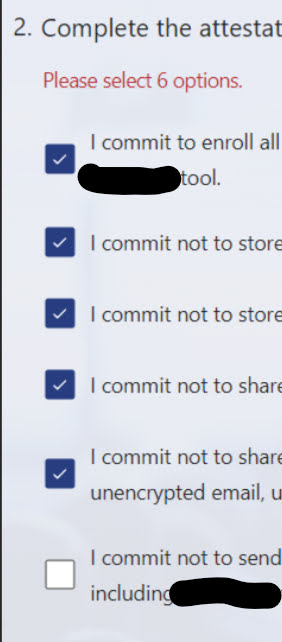
Lately I am seeing attestation forms in the projects I am working in wherein the contents are split across multiple checkboxes followed by a submit button. The beef I have is that the submit button will only be valid/enabled if all checkboxes are set to checked/true.
The problem with this approach is that it gives the wrong perception that you can say I dont agree to one or more of the provided options and you can still proceed. I assume the intent was to increase the possibility that the reader goes through each line but this is still bad form. The assumed intent does not guarantee that readers actually read the lines. All this does is increase the frustration of doing 5 more unnecessary clicks to the form.
If it was up to me, I will just list down the lines and then just put a checkbox at the bottom that states that the reader confirms to reading all the lines and agrees to follow them. It bears the same weight and legality, with 5 lesser clicks.
As of writing, I am working on a very controlled client environment (i.e. Citrix session) where the home drive is in a network share, and the machine session has a locked policy of only allowing signed poweshell scripts to execute.
I have my scripts in the Powershell folder which then gets this error because they are not digitally signed.
A solution presented is to run a new powershell session with the execution policy for the current user set to Bypass. Normally this needs to be done as an admin but it should be doable using the normal user. I wanted this to be part of my VS Code setup and this is how I configured it:
Go to File->Preferences->Settings dialog (or press Ctrl+,)
In the search box, type in “@feature:terminal integrated.profiles.windows”
Click on the “Edit in settings.json” link to open the correct settings file.
Locate the Powershell entry and add the following argument stanza to the “terminal.integrated.profiles.windows” section.
This is part of the “Posts from the Graveyard” which are emails I have sent to my then team or project. I am reposting them here for future reference before I finally delete them from my inbox.
The email was originally sent on August 1, 2014.
Team,
I am not sure if you have come across these little idioms and quotations but these should be apt for what we do:
A stitch in time saves nine.
Knowing just enough to be dangerous.
A fool with a tool is still a fool. [albeit a dangerous fool]
The gist is please understand what we are doing. Do not be complacent in submitting something because it will pass mechanical validation; it should pass the validation of another sentient being like yourself who actually know what is the purpose of the item being validated. Aim to craft and submit something because it is good enough that you wont be embarrassed to say “I created that stuff, marvel at how good it is. That is the <insert-your-name> mark of craftsmanship.” It was mentioned yesterday to complete forms by providing information that is actually useful. The challenge is applying that mentality to every little bit of thing that goes out of your plate. Will you be amenable to buying something that is sub-par with the amount that you are paying? Of course you want something that is of equal or greater value. It should be the same way when we are the ones handling the production side of the equation.
I was working on my trusty and crusty (15 year old!) desktop Pyg which just got a recent Manjaro reinstall, when suddenly the LVM partitions disappeared. The only clue I had is that the 3 directories that I use to access the logical volumes started throwing Input/Output error. I rebooted and it went straight to the recovery console (which is not a good place to be). I tried manually mounting the LVM partitions and it gave this error:
This was a bit of a shock and no reboot or safe mode can restore the directories. I put it off for the night and took it up again today. I was thinking maybe it was a recent Manjaro system in-place upgrade so I tried booting to the latest Ubuntu livecd (using Ventoy, which is very good for creating a multi-system bootable drive) hoping it will show up my lost LVM partitions.
I booted up to the Ubuntu live desktop and I didnt see any LVM mapper entries either. I see the same 800++GB unallocated space at the tail end of the SSD. I launched a filesystem check which didn’t reveal anything and started searching on how to manually input the the LVM sectors in the GPT metadata.
I searched my Google keep for Pyg’s partition layout and then it hit me that all I am seeing is the SSD. There is a WD Blue mechanical drive in this machine before I upgraded to SSD and I used that for storage for files before they are backed up to either DVD or BlueRay. I checked the BIOS of the desktop and it confimred that the HDD is not showing up. Opening up Pyg seems to be my next weekend project.
Curiously enough, I am not feeling as much worry on losing the files as I remember the first time that my WD Green drive malfunctioned. Maybe those files in the LVM partitions (warehouse [files], limbo [multimedia] and arena [game files[) are really not worth that much in the grand scheme of things. If I can still recover them then thats fine but if not then…
I am not stingy when it comes to sharing knowledge. I always say to my team members that I have a 3-strike (or 3 chances) rule when discussing a topic and mentoring at work. Anyone can ask me anything tech-related, soft-skill , or maximizing a loophole three times and I will gladly do it.
I will discuss a topic the first time, normally with fervor if its an interesting topic.
I will discuss the topic the second time because the concepts may not have been clear or entirely alien to the target audience such that details wasn’t properly absorbed the first time.
I will discuss the topic for the third and final time, because I may not be explaining it properly or the “recipient” was not really paying attention.
There is no fourth time. If there is a need for a fourth discussion then it means we have a problem.
This blog has once again changed domain, out of necessity borne by procrastination. Instead of the normal ramfree17.net domain it is , at the time of writing, hosted in the rm17.xyz domain. Same old capsule but different domain. 😀
This is my first post in the new domain and its likely to be a bit long. The TL;DR version is never transfer domains between registrars if the domain is within 1 month of expiration. Unless its a domain you plan on ditching. 😛
The problem was that when I was notified that my web hosting and domain is up for renewal in my previous hosting company I realized that in the span of 10 years the annual cost of this personal blog site has increased by almost 100%. This blog is not monetized (too low reader count) and serves more as my personal venue for ranting without any risk of getting rebuke (my house, my rules). The cost of the annual upkeep is more than what I am willing to shell out. 😉
A week before my domain expires, I began searching for a more affordable web hosting and domain registrar. After careful deliberation, about 5 minutes, I decided to go with www.domainracer.com. The cost of renewing the domain is 33% less and the 3-year hosting plan equates to a 2/3 reduction in annual cost versus if I renew it with my existing provider. The domain transfer comes with 1 year domain registration. The reduction in costs means there were some restrictions like I can only host one site but its not a deal-breaker for my needs. Then I procrastinated under the guise of allowing myself time to contradict or appeal my decision to move the domain.
I read somewhere in the DomainRacer site that transferring a domain can take a couple of days to replicate wherein the site can be inaccessible while the DNS propagation is taking place. I dont think that was going to be an issue. Three days before the expiration day I pulled the trigger since I needed to request from my current DNS registrar for an unlock code for the transfer. The following morning the ticket got a support reply that I can do that by myself using the client portal. I generated the transfer code and proceeded to order the webhosting and domain transfer.
The webhosting space was available after a few minutes, but its tied to the current domain which hasn’t been transferred so I can do anything with it. The domain transfer was marked as pending so I decided to leave it as is and check back in a few days. Three days later I got a notification from my previous hosting provider that my site and domain has expired. I logged into the DomainRacer client portal and saw that the transfer is still in pending state. In my mind the capsule blog is taking a break. :/
A week later the domain transfer was still not completed. I logged a support ticket and the DomainRacer support responded back after less than an hour stating that my domain has expired and I need to renew it in the current registrar before it can be transferred. What ensued is a long back and forth discussion since renewing it in my current registrar and transferring is a double whammy for me as it will require me to basically shoulder the cost twice. I even posted links from the ICANN FAQ page that it should be possible to transferred expired domains. All that support links did nothing as the DomainRacer support said they cant do anything about it.
In the end I just asked for a refund on the transfer and bought a “temporary” domain for the webhosting packaged that I availed. Once my previous domain becomes available I will just register it with DomainRacer and then for the remainder of the year have both domains point to the same webhost. The refund took a day to complete so my first choice of temporary domain “r17.xyz” became unavailable. I guess a bot took notice that I checked its availability and renewed it thinking it can be an opportunity for cybersquatting and getting a potential customer to buy it from them. Big fat chance! 😏
I settled the temporary domain by adding another character thus my new domain. With the domain secured, I proceeded to do a WordPress installation. This floated one of the main restrictions in the “cheaper” package I availed: I can only host one website. What that meant is that the webhosting package was locked to the old “dot net” domain. /groan
I logged a new ticket to link the webhost allocation with the new domain I acquired. I was told by the tech support that they need to delete the contents of the web-hosting allocation and create a new one. There is no content yet so I gave the go-ahead. The only problem now is that once the new domain becomes available I will need to re-initialize this site. 😝
That is basically the ordeal. 30 minutes later I had this blog running. I wont be able to install the URL shortener package since its not available in this webhost but I saw an option to “load” python code so that is an avenue to explore later on.
Additional hindsight: this domain may become” tempermanent” if procrastination rears it ugly head. 😅
Looking out of the building glass facade of the 26th floor office I can see two spiders building their webbed home. I was admiring their resilience and courage because they are doing this in restless winds (based from the violent vibrations of the web) and the fact that I get dizzy looking out of the window. If I feel that then what more for a creature that is about a hundred times smaller than me?
Then I realized that these webs are meant to capture prey. Do other insects fly at this height and winds? Aren’t these two spiders doing a futile activity if they cannot catch any food?
Or am I the fool for missing out what might be crystal clear with these two spiders?
 RSS
RSS